An IT director and a CFO review two documents together. One shows the in-house IT team’s salaries, while the other is an MSP proposal with per-user pricing. The numbers are very different, making the cheaper option seem like the clear choice.
But it’s not that simple. The spreadsheet doesn’t include benefits, staff turnover, tools, after-hours coverage, or the risk of relying on one person’s knowledge. The proposal also leaves out its own limits. So, you’re not really comparing costs, but you’re just comparing invoices.
The purchase price is only a small part of hardware’s total cost of ownership. The real cost depends on how you maintain that hardware over three to five years. This guide brings together the total cost of ownership for direct and managed vendor maintenance, using a six-step method, a hidden-cost checklist, a comparison table, and a decision matrix.
What Is the Total Cost of Ownership?
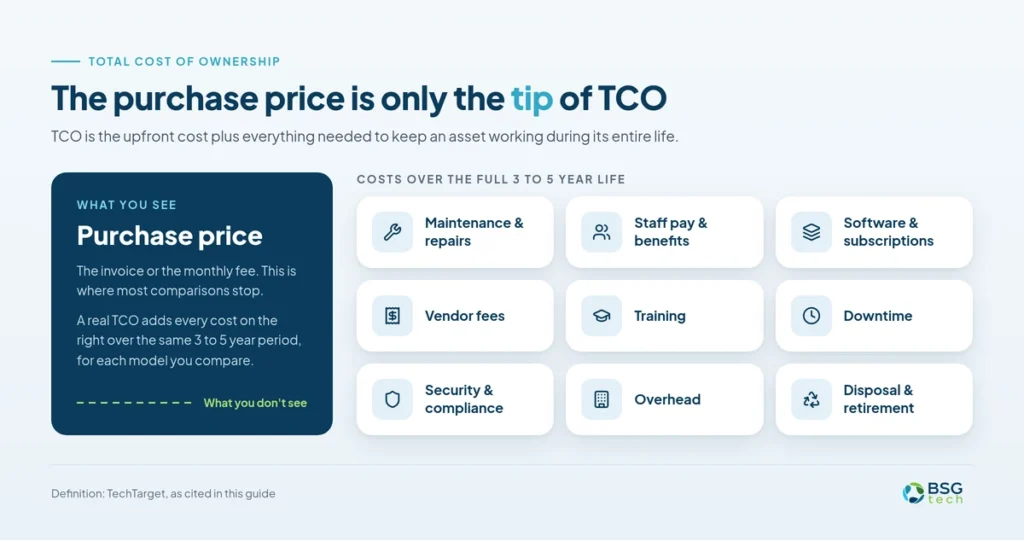
Total cost of ownership (TCO) looks at all the costs of owning and running IT assets or services, not just what you pay upfront or each month. This includes things like employee pay and benefits, software, maintenance, training, downtime, vendor fees, security, and other ongoing expenses throughout the asset’s life.
TCO Beyond Purchase Price
TCO means the upfront cost plus everything needed to keep the asset working, like maintenance, staff time, vendor fees, subscriptions, and overhead during its entire life. TechTarget explains it as the cost of buying, setting up, managing, using, and retiring an asset. This is the foundation of every TCO calculation.
Why Build vs. Buy Is Not Enough
Choosing between in-house and managed services is just one moment in time. Things like staffing, risks, and business plans change. TCO is not a one-time calculation. It’s something you need to review regularly.
What IT Maintenance TCO Includes
IT maintenance TCO covers repairs, patching, monitoring, help desk support, warranties and RMAs, disaster recovery, and compliance work. It does not include strategic leadership or app development, since you pay for those regardless of the model you choose. To see how this fits into the full asset lifecycle, check out IT Lifecycle Management for Corporate Assets.
The Cost of In-House IT Maintenance
The cost of in-house IT maintenance goes well beyond just paying salaries. Benefits alone add about 43% to wages, and you also have to consider expenses for recruiting, training, tools, and downtime.
Salary and Employee Costs
Begin by looking at the total salary cost, which includes base pay, employer taxes, health benefits, retirement, and paid time off. In the Chicago area, network and computer systems administrators earned a median of $103,170 a year (BLS OEWS, May 2025). For private employers, benefits add about 43% to wages, $14.07 in benefits for every $32.82 in wages (BLS ECEC, June 2026), so the real cost for that admin is about $147,400.
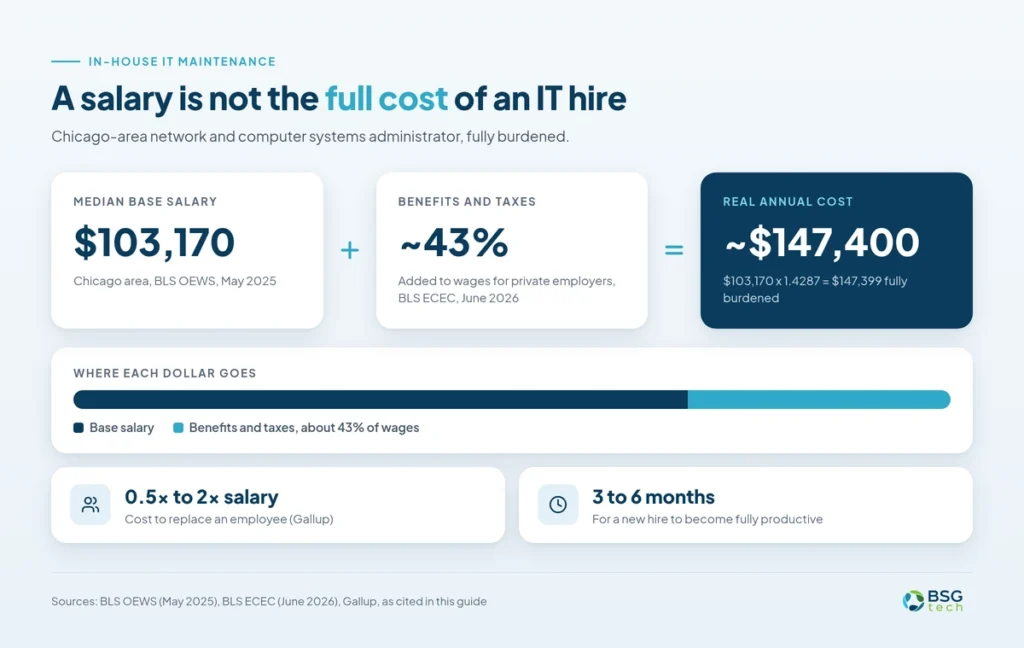
Keep in mind, a $75,000 salary does not mean the total cost is $75,000. With the same benefits and taxes, the actual cost is closer to $107,000. Replacing an employee can cost between half and twice their yearly salary (Gallup). It also takes a new hire about three to six months to become fully productive. Certifications and training add extra costs, which are often hidden in general budgets.
IT Tools and Software Costs
Even a one-person IT team needs a remote monitoring tool (RMM), a ticketing system like ServiceNow or Jira Service Management, asset tracking, and security software, all at full license cost. A managed service provider (MSP) can spread these costs across many clients. You can compare your options in IT Staff Augmentation vs Managed Services and Outsourced Help Desk Services.
Break/Fix and Downtime Costs
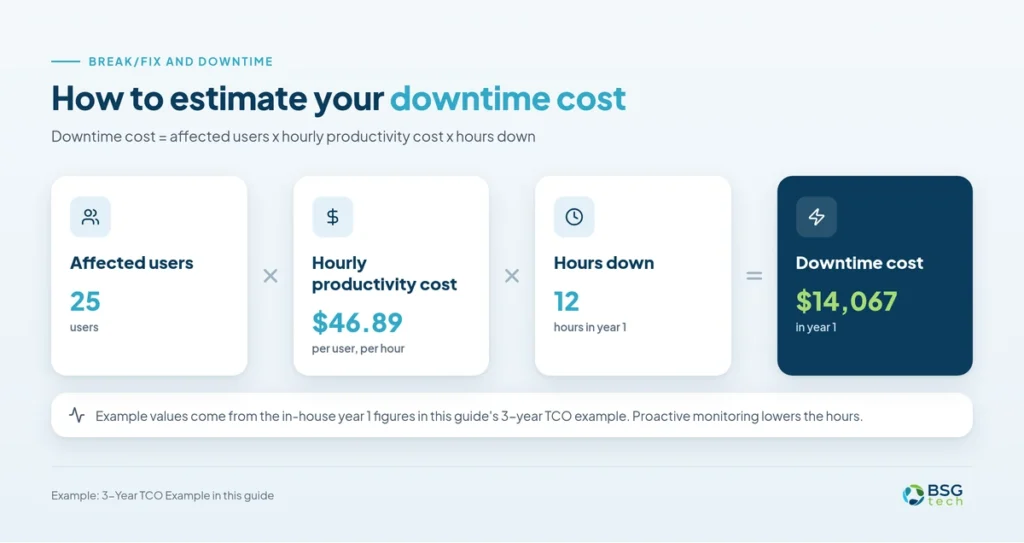
Break/fix costs are the hardest to predict. A single server failure can take up weeks of staff time. You can estimate downtime costs with this formula:
Downtime cost = affected users x hourly productivity cost x hours down
The Cost of Managed IT Services
Managed IT services combine most maintenance costs into one monthly fee. This fee is predictable, but it only covers what your agreement includes.
What the Monthly Fee Includes
MSPs price per user, per device, or in tiers. As a market benchmark, midsize companies typically pay $100 to $200 per user per month (Dataprise, 2026). BSGtech scopes pricing to each environment. Typical inclusions:
- 24×7 monitoring and patching
- Help desk with written SLAs
- Break/fix labor
- Vendor and warranty management
- Monthly reporting
See what moves the price in How Much Do Managed IT Services Cost.
What Managed Services Exclude
Common exclusions are hardware purchases, projects, strategic consulting, custom apps, and after-hours work beyond your SLA tier. Scope creep is the main reason MSP budgets overrun, so get every inclusion and exclusion in writing.
OEM vs. Third-Party Maintenance
OEM contracts come from the hardware maker. Third-party maintenance (TPM) providers can cost 50% to 70% less, a range attributed to Gartner in sponsored TPM vendor content. Real savings depend on your hardware mix, age, and criticality. The trade-offs: slower parts for specialized gear, no proprietary diagnostics, and limited support for the newest generations.
Hidden Costs of IT Maintenance
The biggest IT costs rarely show up on an invoice. They show up when someone leaves, something breaks at night, or an audit goes badly.
Knowledge Concentration Risk
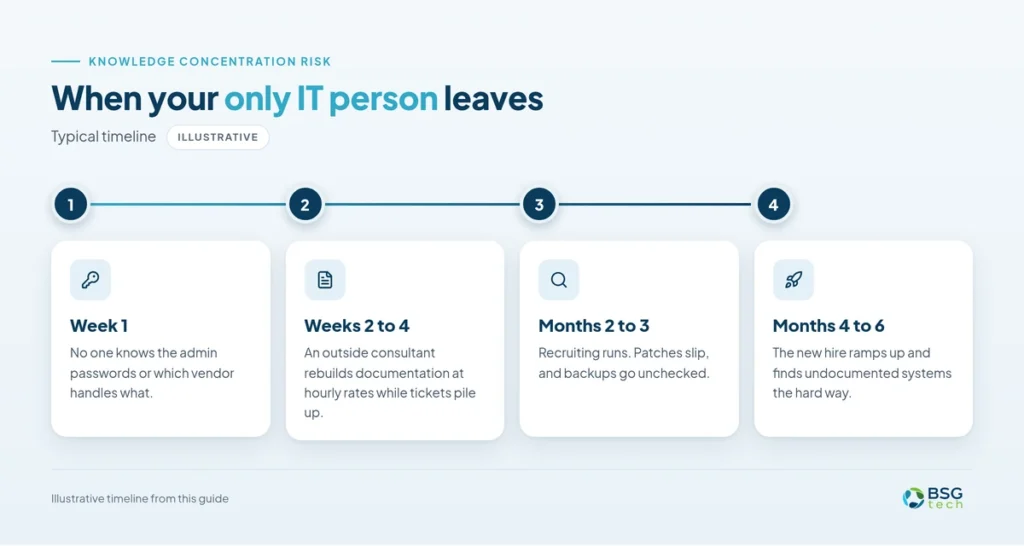
If one person manages all the configurations, vendor contacts, passwords, and workarounds, the business risks having to rebuild everything if that person leaves.
Recruitment and Turnover
The full cost of replacing an employee includes recruiter fees, interview time, onboarding, and lost productivity while the position is vacant. Gallup estimates the total cost is between half and twice the employee’s salary.
After-Hours Coverage
In-house IT teams usually work standard business hours. However, operations and cyber threats happen around the clock. This gap can lead to overtime, burnout, or times with no coverage. MSPs use a shared network operations center, so 24×7 monitoring is often included in the base fee.

Security and Compliance
Missed patches, slow fixes, and failed audits carry real penalties. The average US data breach cost $11.5 million in 2026 (IBM Cost of a Data Breach Report 2026). Rules such as HIPAA, PCI DSS, and CMMC raise the stakes. More in Cybersecurity for Small Businesses, IT Compliance Services, and The Hidden Cost of Outdated IT in Manufacturing.
IT Leadership Opportunity Cost
Every hour your IT lead spends on tasks like resetting passwords is time not spent on projects that help your business grow. This cost is highest when the IT lead is also the only IT staff member.
In-House vs. Managed IT Costs
With in-house IT, most costs come from salaries and unexpected issues. Managed IT puts most costs into a contract, plus anything not covered by the contract. Here is a line-by-line look at the total cost of ownership for direct versus managed maintenance.
Side-by-Side TCO Comparison
| Cost Category | Direct in-house | Managed vendor | Notes |
|---|---|---|---|
| Base Salary | Full salary per IT hire | None for covered work | Chicago admin median $103,170 (BLS OEWS May 2025) |
| Benefits and taxes | About 43% of wages | Built into the fee | BLS ECEC, June 2026 |
| Recruitment | 0.5x to 2x salary per hire | None | Gallup |
| Ramp-up time | 3 to 6 months per hire | Onboarding in year 1 | Planning assumption |
| Training and certifications | Paid per person | Spread across MSP staff | Often hidden in other budgets |
| Monitoring and RMM tools | Full license cost | Included | MSP spreads tool cost across clients |
| Ticketing and asset tools | Full license cost | Included | Check what you keep access to |
| Security tooling | Bought separately | Usually Included | Confirm EDR and email security scope |
| Break/fix labor | Staff time, unpredictable | Included in scope | Out-of-scope work billed hourly |
| After-hours coverage | Overtime or none | 24×7 monitoring typical | After-hours fixes depend on SLA tier |
| Downtime | Users x hourly cost x hours | Same formula | Proactive monitoring lowers the hours |
| Knowledge concentration | High with 1 to 2 staff | Shared documentation | Ask who owns the documentation |
| Residual in-house costs | None | Liaison time, projects, hardware | Count these in the managed column |
| OEM vs. TPM Contracts | Managed by your staff | Often managed by the MSP | Vendor-sourced claim; savings vary |
Which Costs Are Often Overlooked?
- Staff time spent on warranty claims and RMAs
- Tool licenses scattered across department budgets
- The after-hours gap
- Residual in-house costs that remain under an MSP
For smaller firms, see Benefits of Managed IT Services for Small Businesses.
The Hybrid IT Maintenance Model
Hybrid, or co-managed, IT lets your team focus on their strengths while an MSP handles the rest.
How Co-Managed IT Works
Your staff owns user support and institutional knowledge. The MSP covers monitoring, after-hours response, patching, and backup and disaster recovery. Learn more about Co-Managed IT Services.
Hybrid Cost Structure
You pay for a smaller internal team plus a scoped contract. Map every function to one owner, so you neither pay twice nor leave a gap.
When Hybrid Makes Sense
- Your IT staff can’t cover 24×7
- You run specialized apps that need in-house knowledge.
- You’re growing but don’t want to add headcount.
- Compliance needs outside validation.
Choosing the Right Maintenance Model
The right model depends on your size, risk tolerance, and existing skills. Use the matrix below as a framework, not a prescription.
Company Size and IT Staffing
Under 50 employees with no IT staff usually lean managed. 50 to 250 with some IT staff usually leans hybrid. Over 250 with a mature IT team can lean in-house.
Risk and Downtime
Treat risk tolerance as a cost line. The more downtime hurts you, the more your downtime and knowledge concentration costs should weigh in the model.
Skills, Compliance, and Growth
Regulated industries such as healthcare, finance, and defense contracting pay more for every gap. See IT Support for Manufacturers, IT Support for Financial Services, and How to Choose a Managed IT Services Provider.
In-House vs. Managed vs. Hybrid
| Factor | In-house | Managed | Hybrid |
|---|---|---|---|
| Headcount | 250+ employees | Under 50 | 50 to 250 |
| Risk tolerance | High tolerance for gaps | Low tolerance | Low to moderate |
| Skills on staff | Deep and verified | None or very little | Some, not specialized |
| Compliance needs | Mature in-house program | Needs outside expertise | Needs outside validation |
| Growth plans | Steady, predictable | Fast or uncertain | Growing without new hires |
| After-hours needs | Staff rotation exists | Needs 24×7 monitoring | Needs 24×7 monitoring |
How to Calculate IT TCO
You don’t need a total cost of ownership calculator. You need the same scope, the same time frame, and every cost line for each model. Here’s the 6-step method.
Step 1: Define the Maintenance Scope
List every function you need covered:
- Break/fix
- Patching
- Monitoring
- Help desk
- Warranty and RMA handling
- Backup and disaster recovery
- Vulnerability remediation
- Audit support
- After-hours coverage
- Reporting
Step 2: Calculate In-House Costs
Add up the full salary, training, workspace, tools, and recruitment costs spread over how long you expect staff to stay. Don’t forget to include any hidden costs you can think of.
Step 3: Calculate Managed Costs
Ask for a quote that covers everything listed in Step 1. If the quote leaves anything out, add those in-house costs separately.
Step 4: Calculate Hybrid Costs
Combine a smaller in-house team with a contract that covers the rest. Make sure each function from Step 1 is clearly assigned to someone.
Step 5: Project 3 to 5 Years
Include salary raises, vendor price increases, at least one staff turnover, and hardware upgrades in your plan. Looking at just one year can make managed IT look more expensive, since the first year includes onboarding costs.
Step 6: Test Your Assumptions
Try three stress tests: plan for two staff turnovers instead of one, double your downtime hours, and see what happens if your contract goes up by 10% at renewal. If your top choice changes, the decision is closer than you think.
Want someone to check your numbers? Ask for a TCO review, and a BSGtech engineer will go through your model with you.
Hidden Cost Self-Assessment
Check every statement that’s true for your business. The more you check, the more your current TCO is missing.
IT Maintenance Cost Checklist
How to Interpret Your Results
- If you checked six or more, you probably have significant hidden costs. It’s time to recalculate your full TCO.
- 3 to 5 checked: make targeted adjustments to your model.
- Under 3 checked: you likely have a mature cost model.
Checked 6 or more? Book a free TCO review with BSGtech. Smaller teams can also start with IT Services for Small Businesses.
3-Year TCO Example
For example, a company with 75 employees might pay about $634,000 over three years for in-house IT, $461,000 for managed IT, and $549,000 for a hybrid approach. Your numbers will be different, but the method stays the same.
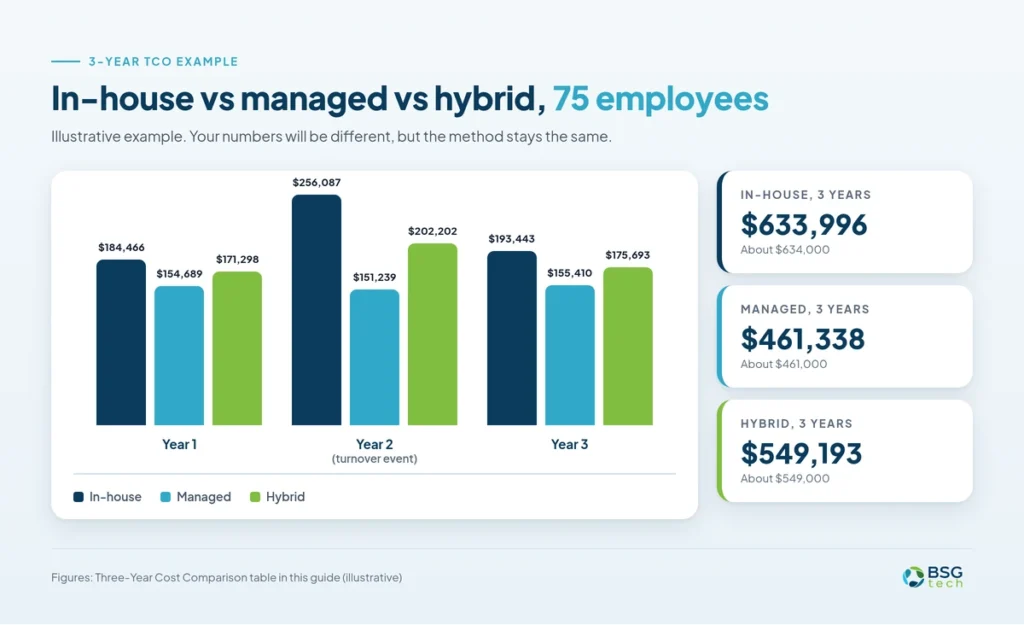
Scenario and Assumptions
The example models a 75-employee company over three years. All three models use the same scope, a 3% yearly increase on pay and fees, and the same downtime rate: 25 affected users at $46.89 an hour, the average private-sector compensation cost per hour worked (BLS ECEC, June 2026).
- In-house: one network and computer systems administrator at the $103,170 Chicago median, fully burdened at 1.4287 ($147,399 in year 1). $23,000 a year for tools, training, and overflow help. 12 hours of downtime a year. One turnover event in year 2, costed at half of salary (the low end of Gallup‘s range), with downtime doubling that year.
- Managed: $150 per user per month, the midpoint of the $100 to $200 market range ($135,000 in year 1). $7,500 a year in residual in-house costs such as vendor liaison time, projects, and hardware. $7,500 one-time onboarding in year 1. 4 hours of downtime a year with proactive monitoring.
- Hybrid: one in-house computer user support specialist at the $60,730 Chicago median (BLS OEWS, May 2025), fully burdened at 1.4287. A co-managed contract at $75 per user per month for monitoring, patching, and after-hours coverage. $5,000 a year in tools and training, $5,000 one-time onboarding, and 6 hours of downtime a year. One turnover event in year 2 at half of salary, with no extra downtime because the MSP holds the documentation.
These are illustrative assumptions, not BSGtech quotes. BSGtech scopes pricing to each environment.
Three-Year Cost Comparison
| Year | In-house | Managed | Hybrid |
|---|---|---|---|
| Year 1 | $184,466 | $154,689 | $171,298 |
| Year 2 | $256,087 (turnover event) | $151,239 | $202,202 (turnover event) |
| Year 3 | $193,443 | $155,410 | $175,693 |
| 3-year total | $633,996 | $461,338 | $549,193 |
The math for in-house year 1: $103,170 x 1.4287 = $147,399 fully burdened, plus $23,000 in tools, training, and overflow help, plus $14,067 in downtime (25 x $46.89 x 12), for $184,466.
Key Takeaways
- Managed IT is the lowest-cost model in every year of this scenario and the most predictable, staying within about $4,200 a year.
- In-house costs the most. The year 2 turnover event alone adds about $67,000 in replacement cost and extra downtime.
- Hybrid lands in the middle, keeping in-house knowledge for about $88,000 more than managed over three years.
- Turnover and downtime move the result more than salary or the monthly fee, so stress-test those two assumptions first.
Common TCO Misconceptions
Many poor TCO decisions come from one of four common mistakes.
Managed Services Are Always Cheaper
That’s not always true. The answer depends on your company’s size, needs, and the team you would replace. Sometimes, a large and experienced IT department can actually be more cost-effective.
In-House Means More Control
Having control without backup makes your system fragile. If only one person has all the access, they control your IT, not you.
Hiring IT Staff Is Easy
Hiring new IT staff can take months, cost a lot in fees, and require extra time needed for training. A managed service provider can boost your team in just a few weeks.
TCO Is a One-Time Calculation
If you only calculate TCO at the start, your numbers will be outdated within a year. It’s best to update your calculations every year.
FAQs About IT TCO
What Is TCO in Procurement?
In procurement, TCO means the total cost of buying, using, maintaining, and eventually getting rid of an asset. It covers more than just the purchase price, including support, labor, downtime, and disposal.
What Is the TCO Formula?
A useful TCO formula is: TCO = upfront costs + labor and benefits + software and tools + maintenance and support + vendor fees + downtime and operational costs + other lifecycle costs. For IT maintenance, add up these costs over the same 3 to 5 year period, and remember to include any costs that stay in-house if you outsource some services.
How Do You Calculate Hardware TCO?
To figure out hardware TCO, add up the purchase price, setup, maintenance, support, downtime, and disposal costs over the product’s refresh cycle. When comparing business laptop brands, look at warranty terms, failure rates, and how long they last, not just the price tag.
What Should TCO Include?
An IT maintenance TCO should include fully burdened employee costs, recruitment and training, monitoring and help desk tools, break/fix labor, vendor fees, warranty administration, after-hours coverage, downtime, security and compliance costs, and leadership opportunity costs. Comparing only salary against a managed services invoice can produce a misleading result.
Is Managed IT Cheaper?
Managed IT isn’t always cheaper. It can lower costs for staffing, tools, after-hours support, and special skills. But if your company already has enough staff and infrastructure, in-house IT might cost less. To compare fairly, include all in-house costs, managed service fees, excluded services, downtime, and any hidden expenses.
How Often Should TCO Be Recalculated?
Recalculate IT TCO at least once a year, and again after any major change, such as staff turnover, a contract renewal, an acquisition, or a new compliance requirement.
What Is a TCO Calculator?
A TCO calculator helps you add up every cost for each option over the same time period. You can also do this yourself by following the 6-step method above.
Calculate Your IT Maintenance TCO
The right maintenance model is the one an honest, fully loaded TCO supports, recalculated every year. Run the self-assessment, work through the 6-step method, then request a TCO review and custom quote from BSGtech, a managed IT services provider in Chicago. Pricing is scoped to your environment, and our engineers have run these numbers from both sides of the table.