Cloud based access control is a door and entry security system that you manage over the internet from a central dashboard, rather than from software installed on a server in your building. Also commonly written as cloud-based access control, it lets you grant or revoke access, issue mobile credentials, and see entry activity from anywhere, on any device. Businesses are switching to cloud-based access control because it replaces lost keycards and clunky on-site servers with mobile phone credentials, automatic updates, and remote management, while giving security teams far better visibility into who enters the building and when.
Table of Contents
ToggleWhat is cloud-based access control and how does it work?
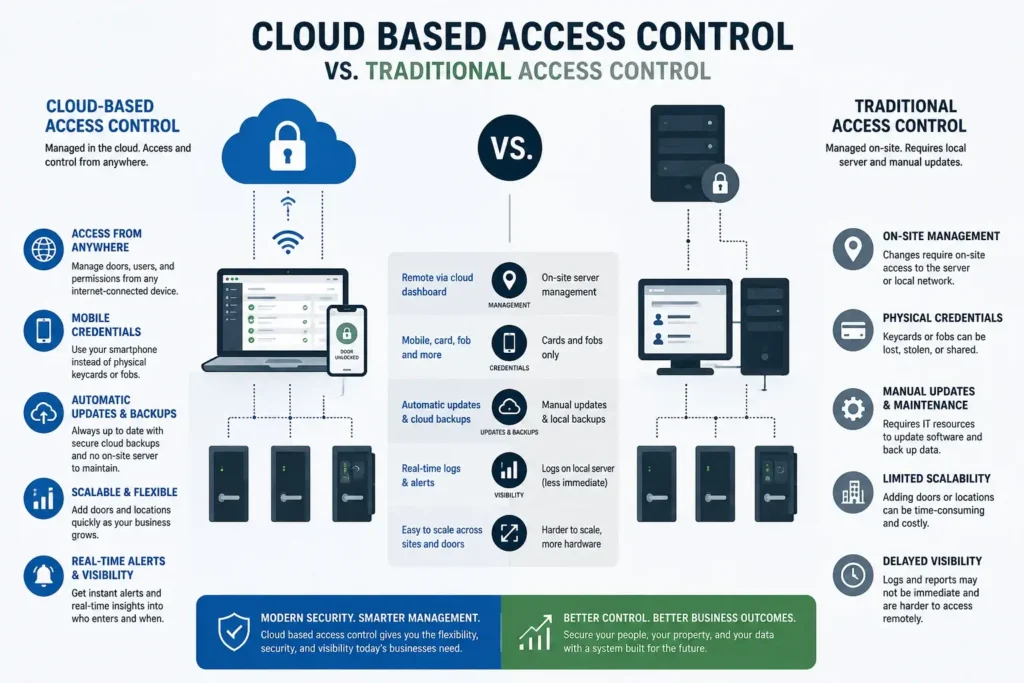
Traditional access control keeps its brains on a server or panel inside your building, which means updates, backups, and management all happen on site. Cloud-based access control moves that management to a secure online platform. The door readers and controllers stay in your building, but the software that decides who gets in, stores the records, and pushes updates lives in the cloud.
In practice, that means an administrator can add a new employee, revoke a departing one, or unlock a door from a laptop or phone, without visiting a server closet. Many systems replace physical keycards with mobile credentials stored on a smartphone, which are harder to lose, clone, or pass around than a plastic badge.
Why businesses are moving to cloud-based access control
The shift from traditional systems to the cloud is driven by real, practical advantages.
Manage access from anywhere. Add, change, or revoke access remotely and instantly, which matters most the moment an employee leaves and their access needs to end.
Mobile credentials. Phone-based keys reduce the cost and risk of lost or shared plastic badges, and employees rarely forget their phone.
Automatic updates and backups. The platform stays current on security patches without your team managing a server, and your access records are backed up in the cloud.
Better visibility. Real-time logs and alerts show who entered which door and when, which supports investigations and compliance.
Easier multi-site management. If you have more than one location, you manage them all from a single dashboard instead of separate on-site systems.
Scales with you. Adding doors or locations is a configuration change, not a forklift upgrade.
Is cloud-based access control secure?
Moving access control to the cloud brings a security consideration that a traditional system does not have to the same degree. Because the system connects to the internet and to your network, it becomes part of your cybersecurity attack surface. A poorly secured access control system can be an entry point for attackers, which is exactly why access control and cybersecurity now belong together. We covered this risk in detail in our post on why your building access system is now a cybersecurity risk.
The answer is not to avoid the cloud, but to choose a reputable platform and secure it properly, with encryption, strong administrator authentication, network segmentation, and regular updates. A provider who manages both your IT and your physical security can make sure your access control system strengthens your security rather than weakening it. For one increasingly common credential option, see our post on facial recognition access control.
What to look for in a cloud-based access control system
Not every system or installer is equal. When you evaluate options, focus on a few things.
Mobile and multi-credential support. Look for phone-based credentials alongside cards and fobs so you can choose what fits each door and user.
Strong security by design. Encryption, secure administrator sign-in with multi-factor authentication, and regular firmware updates should be standard. NIST also provides guidance for authentication credentials used in physical access control systems, reinforcing the importance of choosing authentication methods based on the security risk of the facility being protected.
Integration with your other systems. The best value comes when access control works alongside your cameras and alarm systems rather than in isolation.
A partner who understands both worlds. Because these systems live on your network, a provider who handles both IT and physical security will secure and support them far better than a standalone installer.
Which businesses benefit most from cloud-based access control
Almost any organization with doors to secure can benefit, but the value is greatest in a few situations.
Businesses with staff turnover. If employees, contractors, or volunteers come and go, instantly revoking access from anywhere protects you the moment someone leaves.
Multi-location operations. Managing every site from one dashboard saves enormous time compared to separate on-site systems at each location.
Regulated or sensitive environments. Financial, healthcare, and professional firms that must control and prove who accessed a space gain from detailed, cloud-stored entry logs.
Growing companies. If you expect to add doors, sites, or people, a cloud system scales through configuration rather than costly hardware overhauls.
Any business rethinking security after an incident. If a lost badge or an unauthorized entry has already caused a scare, cloud access control closes that gap quickly.
How BSGtech delivers access control in Chicago
BSGtech designs, installs, and manages cloud-based access control for businesses across Chicago and the surrounding suburbs, as part of a security approach that treats physical security and cybersecurity as one. Because we manage both your IT and your building security, we make sure your access control system is convenient for your team and hardened against attackers. From mobile credentials to multi-site management, we help you control who enters your space and see exactly what is happening. Every engagement starts with a free security assessment.
Frequently Asked Questions
What is cloud-based access control?
Cloud-based access control is a building entry system managed over the internet from a central dashboard instead of an on-site server. It lets administrators grant or revoke access, issue mobile phone credentials, and view entry activity from anywhere, while door readers and controllers remain installed at the building.
Is cloud-based access control secure?
Cloud-based access control is secure when the platform is reputable and properly configured. Because it connects to your network and the internet, it becomes part of your cybersecurity attack surface, so encryption, strong administrator authentication, network segmentation, and regular updates are essential. A provider who manages both IT and physical security can secure it fully.
What is the difference between cloud and traditional access control?
Traditional access control runs on software installed on a server in your building, so management happens on site. Cloud-based access control moves that management to a secure online platform, allowing remote administration, mobile credentials, automatic updates, and multi-site control, while the readers and controllers stay installed at each door.
What are mobile credentials in access control?
Mobile credentials are digital keys stored on a smartphone that replace or supplement physical keycards and fobs. Employees unlock doors with their phone, and administrators issue or revoke these credentials instantly from the cloud. Mobile credentials reduce the cost and security risk of lost, cloned, or shared plastic badges.
Can cloud-based access control work across multiple locations?
Cloud-based access control is well suited to multiple locations because every site connects to the same online platform. Administrators manage all doors and users across every location from a single dashboard, apply consistent policies, and view activity everywhere, without maintaining a separate server or system at each site.

Michael Kahn is the founder and president of BSGtech, which has provided managed IT, cybersecurity, and backup services to Chicagoland businesses since 2009. He writes about technology in plain terms for owners who don't have IT staff in house. Read more about the author.
